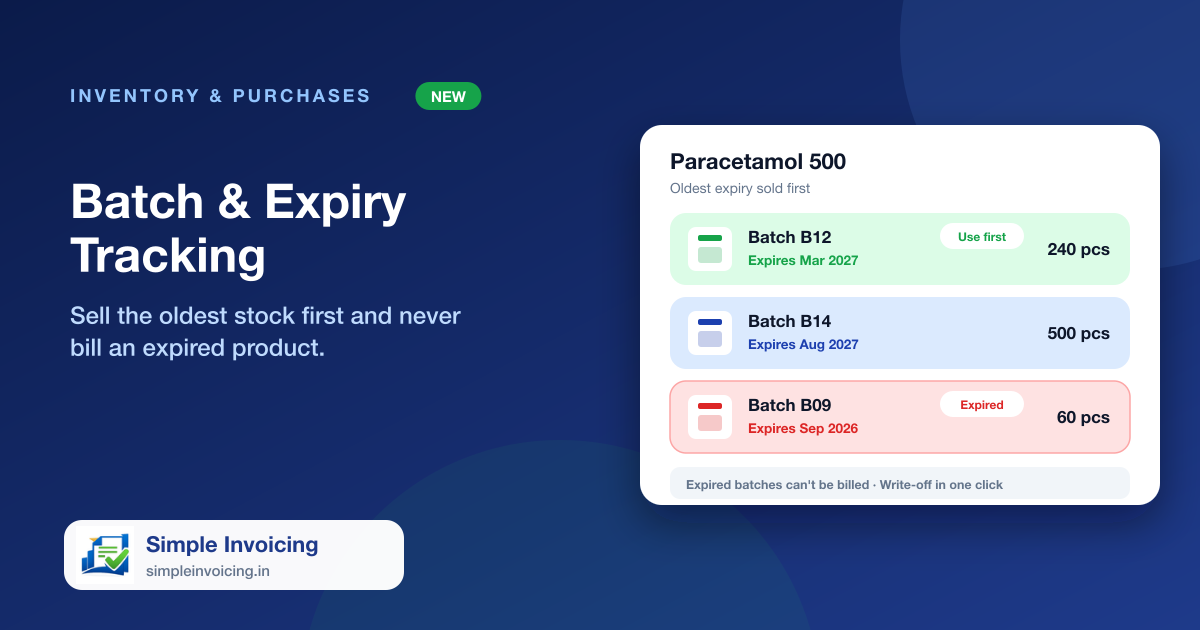
Medicines, food and cosmetics arrive in batches that expire. Simple Invoicing records the batch number and expiry when you receive stock, picks the batch that expires first when you bill, and refuses to sell anything that has expired.
What you can do
Batch and expiry on every purchase
Enter the batch number, manufacturing date and expiry date as you receive stock. The same batch received again is simply topped up.
Earliest expiry first
At billing the oldest sellable batch is used automatically, and a large quantity is split across batches. You can switch a line to another batch.
Expired stock cannot be sold
Expiry is checked against the invoice date. A batch is still sellable on its expiry date, never after it.
Expiry report and write-off
See what has expired or will expire in 30, 60, 90 or 180 days with its value at cost, and write expired stock off in one click.
Also included
- Warning window before expiry, set per item
- Dashboard tile for expired and soon-to-expire batches
- Batch number and expiry shown on the invoice
- Cancelling a sale returns stock to the same batch
Frequently asked questions
Is the expiry check only on the screen?
No. It is enforced when the invoice is saved, so an expired batch cannot be sold even by mistake.
Can I record stock with no expiry date?
Yes. Turn off the expiry requirement for items that are tracked by batch but do not expire.
Is the online store supported?
Not yet. Batch items are billed at the counter.